|
Setting up Recurrence Templates
Navigate to Admin  Recurrences My Recurrence Template to view all the recurrences that you have created and/or to create a new recurrence. Recurrences My Recurrence Template to view all the recurrences that you have created and/or to create a new recurrence.
Note:
- Users can also create recurrence templates from calendar if their calendar is designed to show components that have recurrence enabled.
- In addition to having the required policy roles, users must have "Create" access to the components (that have recurrence enabled), for them to be able to create recurrence templates.
Recurrence Details
Label
|
Notes
|
Title
|
Specify a title for the Recurrence template that clearly describes the purpose of the activity.
|
Form
|
System displays a filtered list of Forms for components where Recurrence is enabled.
|
Component
|
Read only field that is automatically populated by the system based on the selected Form.
|
Start
|
Select the date on which the recurrence should begin.
|
Repeat
|
Choose how often records should be generated from the predefined frequency options:
|
Every
|
Define the interval between occurrences.
For example, if Repeat is set to Daily, select whether the task occurs every day or every 2 days, etc.
|
On
|
Only shown if Repeat is Weekly.
Select the days of the week on which the task is due (Mon-Sun)
|
End
|
Specify when the recurrence should stop:
- On this day - select an End Date; no records will be generated after this date.
- After n occurrences - specify the number of occurrences; the recurrence stops after that count.
- Never - the system continues generating records indefinitely.
|
Create Record
|
Define how many days before the Due Date the record should be created.
The system does not generate all records at once; records are created progressively based on this setting.
Example: If an Action is due every Wednesday and "Create Record" is set to 2 days before, the record will be created on Monday of every week.
|
Rule
|
Displays a summary of the configured recurrence rule and schedule.
|
Example template
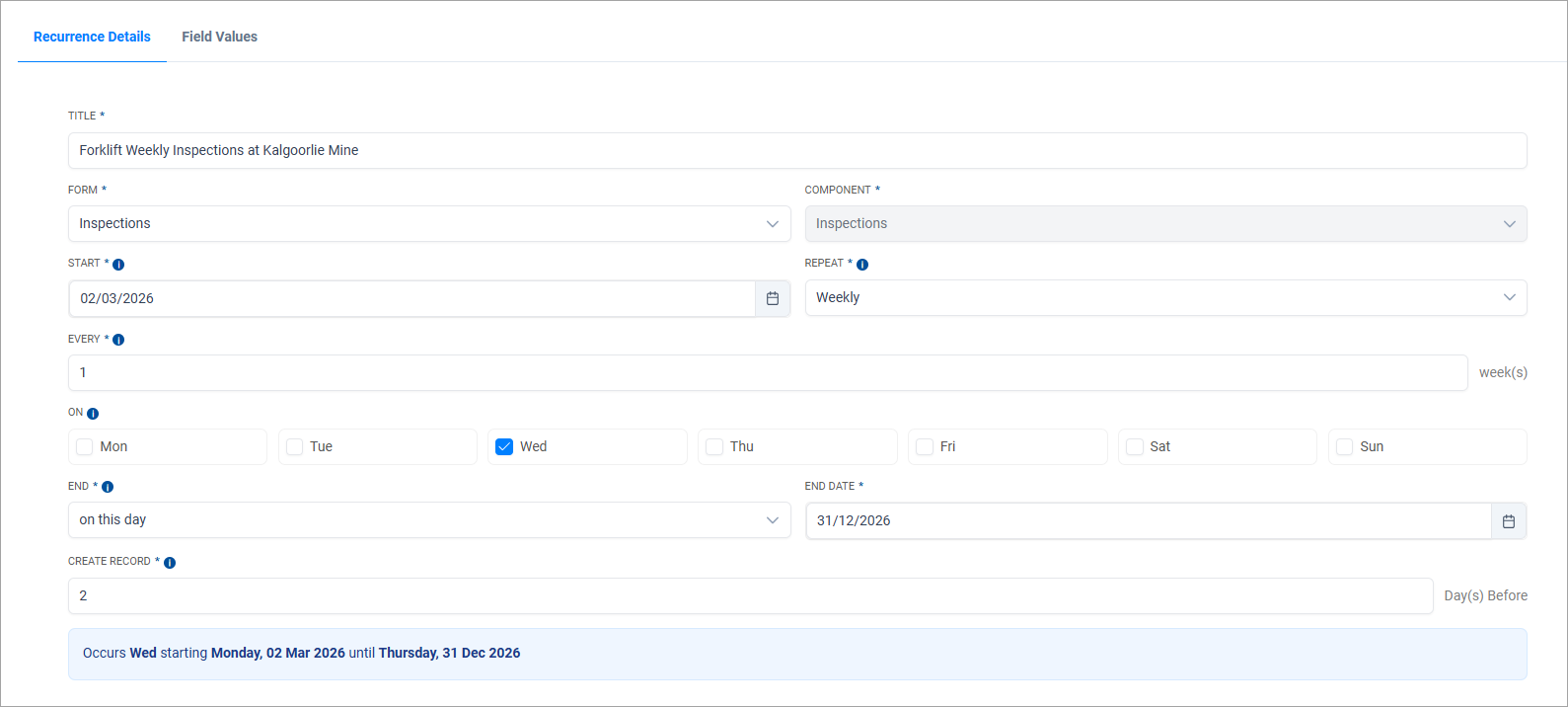
Defining the Field Values for the Recurrence Template
Upon saving the Recurrence Details page, the system displays the Field Values page. This allows users to define the values that will be applied to each record when it is generated as part of the recurrence.
- The system respects all form configurations, including default values, validations, read-only fields and mandatory settings.
- Form actions and analytics rules are triggered in the same way as they are for a standard record.
- Only fields from pages that are visible during Create New record creation are displayed in the Field Values tab for setting up the recurrence template.
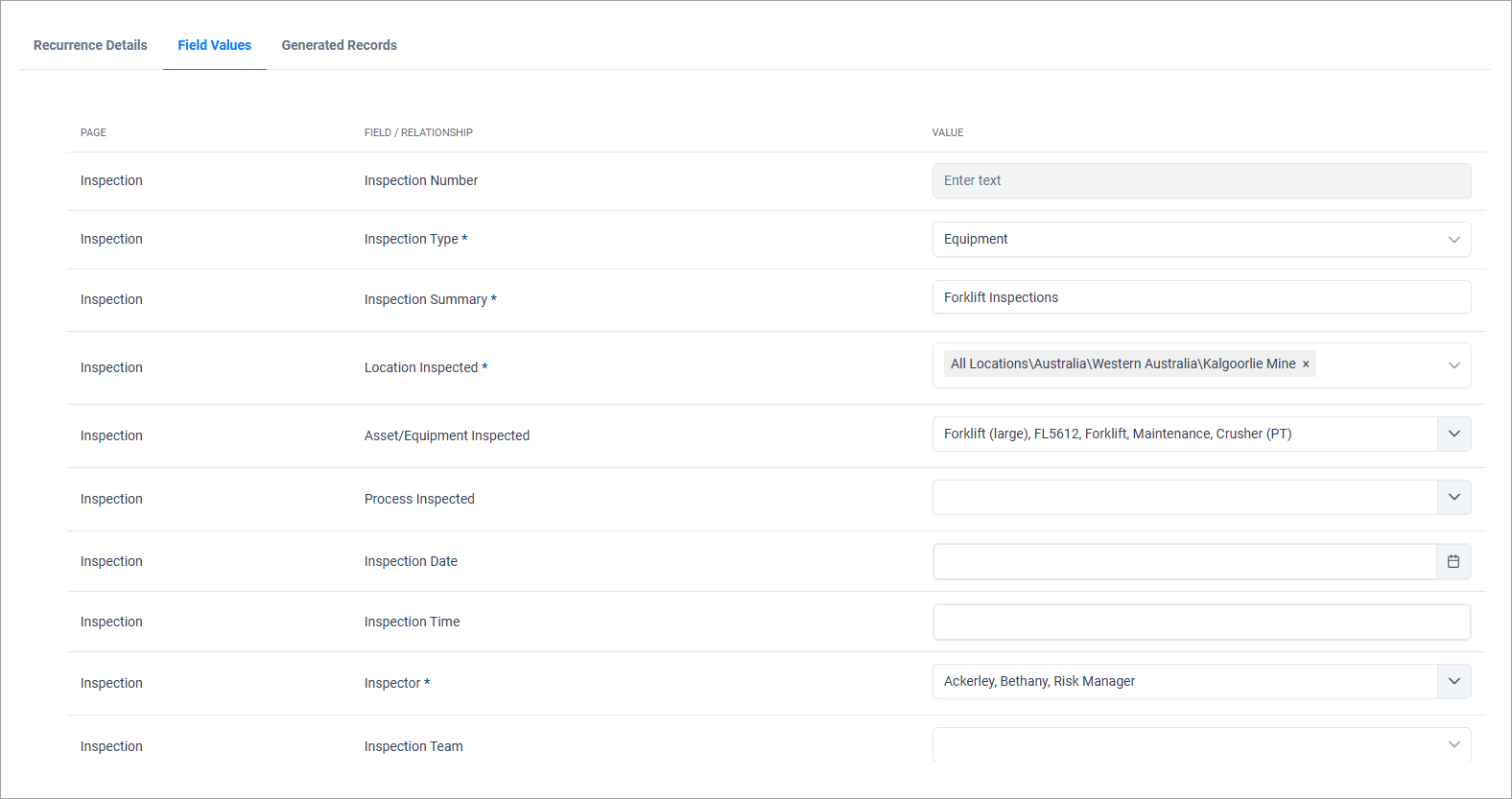
The following system limitations apply only when configuring/defining the Field Values for a recurrence template.

|
These limitations apply solely during the recurrence template setup. Once the recurring records are generated and are accessed via the Workspace menu, all form definitions and behaviours are fully enforced.
|
- Dynamic Rows visibility is not enforced
- Optional filters are ignored
- Users locality settings (such as date, time and number formats) are not applied.
- The 'Template Select' field type is not supported for Questionnaires and Walkthrough templates. However, the standard Questionnaire and Walkthrough field types are supported.
- Keyword (Field) filtering of Questionnaire and Walkthrough templates – where templates are filtered using the field value are ignored.
Static and Dynamic keyword configurations are supported.
Activate the Template & View Generated Records
Once the field values are defined, the next step is to activate the template. Review all entries on the Field Values page carefully, as these values will applied to every record generated from this template.
Enable the Activate Template option to make the template active.
- When the template is activated, the first record in the series is generated immediately.
- All records created from this recurrence template can be viewed in the Generated Records tab.
- Once activated, the Form and Start Date fields become read-only and cannot be modified
To de-activate or stop the recurrence schedule, update the End Date. No further records will be generated after the end date is reached.
|


